The golf course
Tom loves golf, so the start screen's ground is a golf course: one hole a day, seen from straight above like a course map, lying on its side with the tee at the right and the green at the left, in the same low-poly style as the time-of-day sky it sits under. The first day a phone runs the app it shows hole 1, the next day hole 2, and so on round to 18, then the round starts over. Nothing is said about it and nothing is asked: the hole is decoration, like the sky, and screen readers skip it the same way. The home screen widget shows the same hole over the same sky.
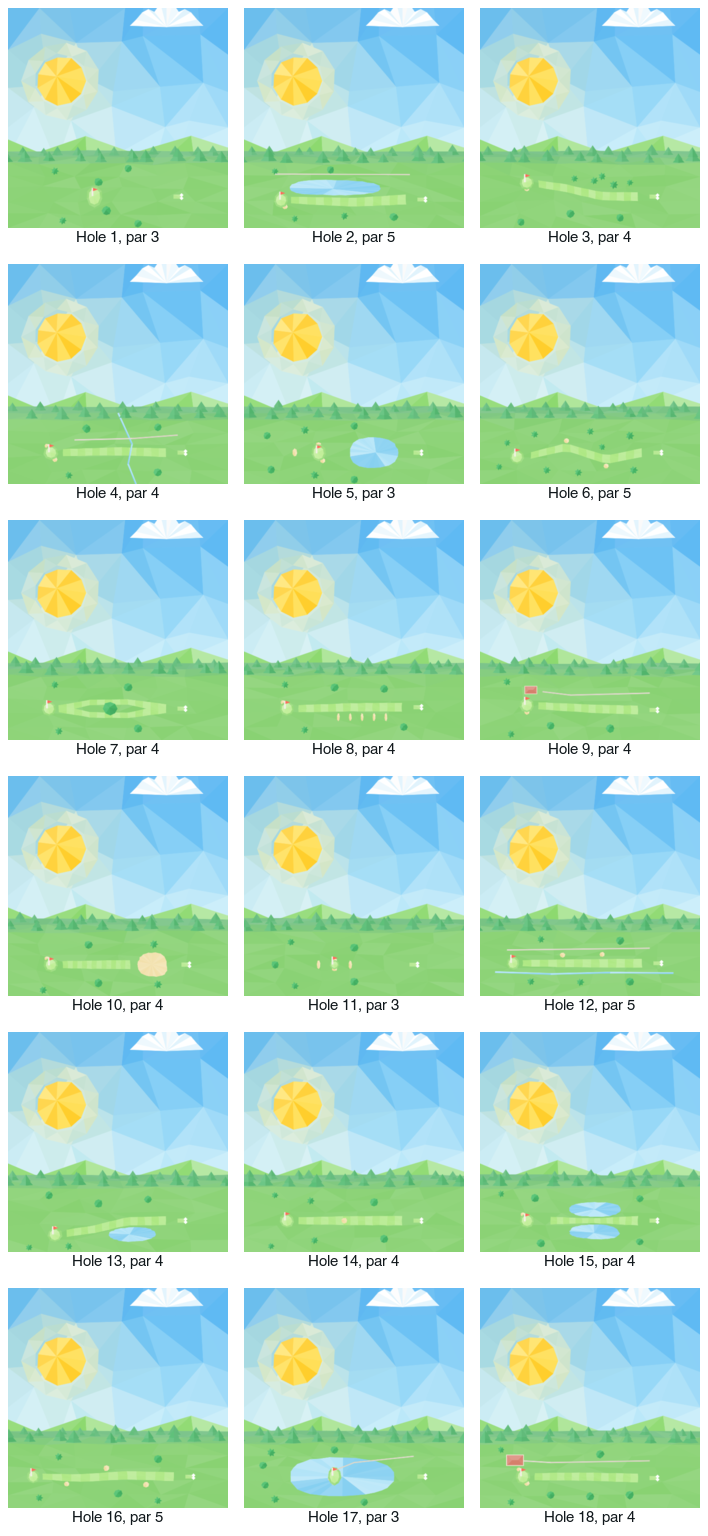
The eighteen holes
A par 72: four par 3s, ten par 4s, four par 5s, 36 out and 36 in. Each hole has one thing that makes it that hole.
| Hole | Par | What makes it that hole |
|---|---|---|
| 1 | 3 | No sand, just a short iron. |
| 2 | 5 | A long pond down the right. |
| 3 | 4 | Dogleg right round the pines. |
| 4 | 4 | A creek and a little bridge. |
| 5 | 3 | Over water, sand all around. |
| 6 | 5 | A double dogleg in the trees. |
| 7 | 4 | The fairway splits at an oak. |
| 8 | 4 | Church pews down the left. |
| 9 | 4 | Turning for the clubhouse. |
| 10 | 4 | A waste bunker off the tee. |
| 11 | 3 | The postage stamp green. |
| 12 | 5 | A creek along the left. |
| 13 | 4 | Dogleg left over the lake. |
| 14 | 4 | A pot bunker mid-fairway. |
| 15 | 4 | Twin ponds pinch the fairway. |
| 16 | 5 | The long one: three bunkers. |
| 17 | 3 | The island green. |
| 18 | 4 | Home to the clubhouse. |
A few are nods to famous holes: the church pews of Oakmont, the postage stamp at Troon, the Hell bunker at St Andrews, the island green at Sawgrass.
Which hole today
The round belongs to the phone. The first time this build asks, on the
start screen or in the widget sync, the phone stores the golf day it opened
on (golf-round-v1 in AsyncStorage, { "openedOn": "2026-10-13" }) and
never changes it. The hole is the number of whole golf days since then,
modulo 18. Switching who is using the app in Settings does not move the
round, nothing records usage, and deleting the app starts a new round at
hole 1.
A golf day begins at 5:00 a.m., with the early-morning scene, and never at any other moment. Between midnight and 5:00 the night scene still shows yesterday's hole. That is also why the widget needs no extra timeline entries: the hole changes at a scene change it already has.
To see a chosen hole in a development build, set
EXPO_PUBLIC_GOLF_OPENING_DAY in apps/mobile/.env to a golf day, such as
2026-10-02 for hole 12 on October 13, and the round opens on that day
instead of what the phone stored. It is never set in the EAS preview or
production profiles.
Two pictures, not a hundred and eight
A finished picture for every hole under every sky would be 108 pictures, about 44 MB at the skies' size. Instead the skies stay as they are, and a hole is a transparent overlay of the ground only, drawn on the sky's own canvas. The sky, the sun or moon, the stars, and the peaks of the back hill ridge show through above a wobbly treeline, so the same hole looks different six times a day.
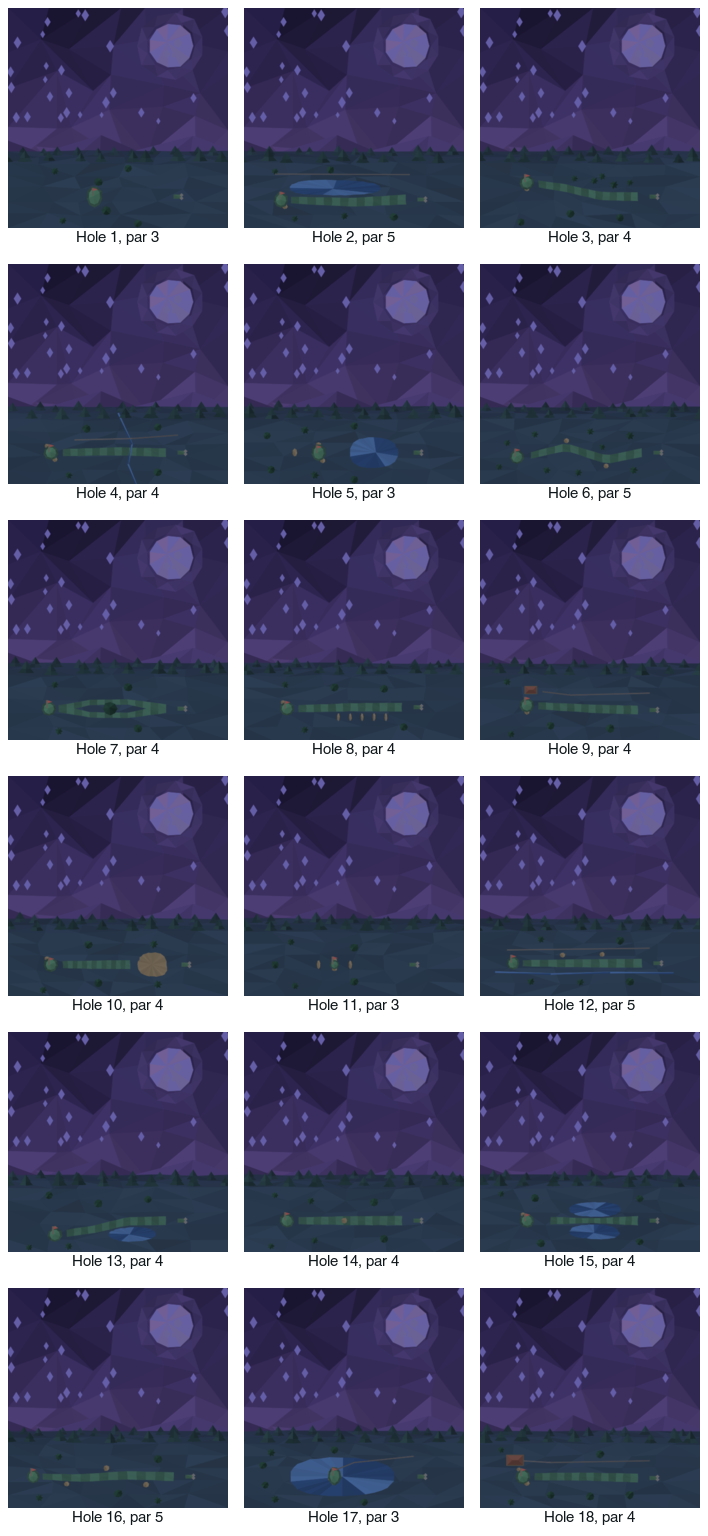
Each hole is drawn twice, since text sits on these pictures and one set of colors cannot read under both inks:
- By day, for early morning and the four daylight scenes, in colors
light enough for the dark text (
#11181C). - By night, a moonlit course in colors dark enough for the light text
(
#ECEFF1).
Every facet keeps at least 4.5:1 contrast with its variant's ink, checked
by tests/golf-holes.test.ts from the SVGs, which also fails on any
translucent facet, because one would blend with the sky behind it and the
contrast could no longer be promised.
Where the code is
src/features/golf/course.jsondescribes the course: the two palettes and, for each hole, its number, par, and that one line, plus the shapes the drawing script reads: tee (with its two white markers), fairways, green, flag, bunkers, water, sand, creek, cart path, trees, clubhouse. Positions are course units,xfrom -1 (the bottom of the picture) to 1 (the top) andzfrom 0 (the right, by the tee) to 1 (the left, past the green). They were written for a camera behind the tee, so a round green'srzis about 0.6 of itsrx; the script'sROUNDundoes that.src/features/golf/round.tsanswers "which hole is it" (holeFor), "when did this golf day begin" (holeStart), and "when does it change next" (nextHoleChange). The day begins atGOLF_DAY_STARTS_AT, which is the first scene's hour, never a second constant.src/features/golf/round-storage.tskeeps the phone's opening day (loadRoundOpening), serialized so the start screen and the widget sync settle on the same day on a first launch. It never throws: unreadable storage opens the round today, for that run.src/features/golf/pictures.tspicks the variant by the scene's scheme and the picture by hole, variant, and format, frompictures.generated.ts, the literalrequire()map the render script writes.src/features/golf/use-golf-hole.tskeeps the start screen's hole current throughuseScheduledValue(src/hooks/use-scheduled-value.ts), which the time-of-day scene uses too. It is null until the round has been read, so a later day never flashes hole 1 first.StartScreeninsrc/features/memories/memories-screen.tsxdraws the hole as a second cover-fit image over the sky, lined up with the bottom of the window (contentPosition="bottom") while the sky stays centered, so no display crops the course: a phone shorter than the picture, or an iPad, loses only sky. The hole's ground covers the sky's own, so the two pictures need not line up.COURSE_ROOMis the room the Memories button leaves under it, a share of the window's width because the course scales with the width. That room gives way first: with a long reminder and an appointment on a small phone, the button sits over part of the course.
On the widget
The widget stacks a second image over its background, with the same
modifiers, so the two are cropped the same way. The sync
(src/features/widget/sync-memories-widget.ts) reads the phone's round,
copies into the App Group folder only the hole pictures the coming week's
timeline names (at most eight holes, by day and by night), and puts each
entry's holeUri beside its backgroundUri. Copies from earlier weeks stay
in the folder; they are small and the next sync overwrites any it needs
again.
Drawing the pictures
scripts/render-golf-holes.mjs needs ImageMagick 7 (brew install
imagemagick). It shares its color arithmetic, contrast nudge, seeded
randomness, canvases, and writers with the sky script through
scripts/lib/low-poly.mjs, and draws each hole from straight above, in the
ground below the treeline. For each hole it writes, into
apps/mobile/assets/images/golf/:
hole-07-day.svgand.png, for the start screen: drawn on the sky's 1290 by 2796 canvas and rasterized at two thirds of it, 860 by 1864. The PNG bytes are in the antialiased facet edges, and two thirds of them is what keeps the course small, and flat facets scaled up by one and a half show no softness on a phone.hole-07-day-widget.svgand.png, 640 by 640, for the widget.- The same two with
-night.
Then it writes src/features/golf/pictures.generated.ts and the two
contact sheets on this page. The drawing is seeded by hole and canvas,
never by variant, so day and night are the same drawing recolored, facet
for facet, and a re-run without changes draws the same pictures. Never edit
the SVGs, the PNGs, or the generated map by hand.
The whole course is about 4.8 MB: portraits under 110 KB each and widget
squares under 60 KB. tests/golf-holes.test.ts holds each picture and the
folder to a budget (120 KB, 72 KB, and 5.5 MB) so a drawing change that
swells the bundle fails the build rather than shipping.
Changing a hole
Edit its entry in course.json, or the drawing in the script, and run
pnpm golf:render, then the tests. Adding or removing a hole is the same:
the script writes the pictures and the map for whatever the file holds, and
the tests expect eighteen, a par 72, and the four pictures each.